Showing posts with label AGOL. Show all posts

Tuesday, June 9, 2015

ArcREST Publishing Part 2 - SD Files

The easiest and quickest way to get data into AGOL/Portal is to publish from a service definition file, or SD file.  SD files are compressed files using 7-zip.  They contain all sorts of information about how your service behaves, what it's name is, the service's data, etc...  It's a complete package or all in one file for publishing services.

You can automate the creation of service using Python or AO, but I am not going to dive into that topic.  Instead I am going to show how you can easily publish the SD file using ArcREST to your site (AGS, AGOL or Portal).

This example is going to focus on solely the publishing of SD files to AGOL.

import arcrest
import json
import time
#--------------------------------------------------------------------------
if __name__ == "__main__":
    username = "someadminuser"
    password = "reallysecurepassword"
    sd_file = r"C:\temp\1\DemoPublishing.sd"
    proxy_port = None
    proxy_url = None

    #   Connect to the site
    #
    sh = arcrest.AGOLTokenSecurityHandler(username, password)
    admin = arcrest.manageorg.Administration(securityHandler=sh,
                                             initialize=True)
    content = admin.content

    uc = content.usercontent(username)
    ip = arcrest.manageorg.ItemParameter()
    ip.title = "DemoPublishing"
    ip.type = "Service Definition"
    ip.tags = "SD, publishing, example"
    ip.typeKeywords = "Data, Service, Service Definition"

    res = uc.addItem(itemParameters=ip, filePath=sd_file)
    itemId = res['id']
    # Publish the SD File
    #
    resPublish = uc.publishItem(fileType="serviceDefinition",
                                publishParameters=None, itemId=itemId)
    jobId = resPublish['services'][0]['jobId']
    serviceItemId = resPublish['services'][0]['serviceItemId']
    flUrl = resPublish['services'][0]['serviceurl']
    status = uc.status(itemId=serviceItemId, jobId=jobId)
    while status['status'].lower() == "processing":
        time.sleep(2)
        status = uc.status(itemId=serviceItemId, jobId=jobId)
    print 'service published.'
    print 'Bonus Demo - update some additional properties on a feature service'
    flAdmin = arcrest.agol.FeatureService(url=flUrl, securityHandler=sh).administration
    # Bonus 1- Enable edits Only
    updateDefinition = """{"hasStaticData":false,"capabilities":"Query,Editing,Create,Update,Delete","allowGeometryUpdates":true,"editorTrackingInfo":{"enableEditorTracking":false,"enableOwnershipAccessControl":false,"allowOthersToUpdate":true,"allowOthersToDelete":true}}"""
    print flAdmin.updateDefinition(json_dict=json.loads(updateDefinition))
    # Bonus 2- Enable edits with export data - adds 'Extract' to capabilities
    updateDefinition2 = """{"hasStaticData":false,"capabilities":"Query,Editing,Create,Update,Delete,Extract","editorTrackingInfo":{"enableEditorTracking":false,"enableOwnershipAccessControl":false,"allowOthersToUpdate":true,"allowOthersToDelete":true}}"""
    print flAdmin.updateDefinition(json_dict=json.loads(updateDefinition2))
    # Bonus 3- Enable Sync on services - Adds 'Sync' to capabilities
    updateDefinition3 = """{"hasStaticData":false,"capabilities":"Query,Editing,Create,Update,Delete,Sync,Extract","editorTrackingInfo":{"enableEditorTracking":false,"enableOwnershipAccessControl":false,"allowOthersToUpdate":true,"allowOthersToDelete":true}}"""
    print flAdmin.updateDefinition(json_dict=json.loads(updateDefinition3))
    # Bonus 4- Enable editor tracking on service - set enableEditorTracking = True
    updateDefinition4 = """{"hasStaticData":false,"capabilities":"Query,Editing,Create,Update,Delete,Sync,Extract","editorTrackingInfo":{"enableEditorTracking":true,"enableOwnershipAccessControl":false,"allowOthersToUpdate":true,"allowOthersToDelete":true}}"""
    print flAdmin.updateDefinition(json_dict=json.loads(updateDefinition4))
    print 'finished!'


I added some additional information to the example here.  The basic example ends at the print 'service published' part.  The additional code below shows how to enable the editing, export data, sync or track edits.  You can do this all in call, but I wanted to show how you enable each one at a time because you may only want to enable one function over another.  Notice how I get the feature service URL from the publish() then I take that URL and create a Feature Service object from the agol.FeatureService Class.  Since my user is an administrator and owner of the service, I can access the back end function to enable the additional properties.  On the Feature Service class, there is a property called administration which takes you to the hostingservice.AdminFeatureService class which allows users to update the service definitions on a hosted feature service.

I threw a lot out there, and I hope it helps!

Previous posts on publishing:
Part 1 - Publish CSV files can be found here.

Friday, May 8, 2015

ArcREST Basics - Creating a Group

Managing your portal or AGOL site can be a tough task, and ArcREST is here to help.  Often within your organization, individuals need new groups or maybe you need to create a set of default groups.  ArcREST allows individuals to create a list of group then put users into that group easily.  

The Pointy Hair Boss (http://www.andrewlipson.com/)

So here is the situation.  You boss wants you to create a group called 'Publishing Review'.  This group will contain all your users must be in this group.  The point of this group is that non-administrator accounts cannot publish to the public, and any data within this group will be reviewed by administrators on a given cycle and published if the information meets the organizations standards.

Let's begin!

import arcrest
#--------------------------------------------------------------------------
def getAllUsers(portalId, admin):
    """
       returns all the users for a given AGOL

       Inputs:
          portalId - unique id of the portal
          admin - manageorg.Administration object
       Output:
          returns a list of the users
    """
    start = 1
    num = 100
    portals = admin.portals(portalId=portalId)
    count = 0
    nextStart = 0
    results = []
    while nextStart > -1:
        users = portals.users(start=start + (num * count),
                              num=num)
        results = results + users['users']
        count += 1
        nextStart = users['nextStart']
        del users
    return results
#--------------------------------------------------------------------------
if __name__ == "__main__":
    #   Connect to the site
    #
    sh = arcrest.AGOLTokenSecurityHandler(username, password)
    admin = arcrest.manageorg.Administration(securityHandler=sh,
                                             initialize=True)
    community = admin.community
    portals = admin.portals()
    groups = community.groups
    portalId = portals.portalId
    #   Create Group
    #   Basic group inputs
    access = "org"
    groupTitle = "Pre Publishing Group"
    groupTags = "Publishing;Service Management"
    description = "This group allows users to request publishing services to public."
    # search to see if the group exists. If not, create the group, else use the ID 
    searchResult = community.getGroupIDs(groupNames=groupTitle)
    if len(searchResult) == 0:
        groupId = community.createGroup(title=groupTitle,
                                tags=groupTags,
                                description=description,
                                snippet="",
                                phone="",
                                access=access,
                                sortField="title",
                                sortOrder="asc",
                                isViewOnly=False,
                                isInvitationOnly=False,
                                thumbnail=None)['group']['id']
    else:
        groupId = searchResult[0]
    # Get all the site's users and add them to the group
    users = [user['username'] for user in getAllUsers(portalId=portalId, admin=admin)]
    if len(users) > 0:
        groups.addUsersToGroups(users=",".join(users), groupID=groupId)

So let's review the code.  First we connect to our site.  Next we grab all the objects we will need to work with in order to make the magic happen.  Since the topic is groups, there is a need to work with the community functions as well as some portal functions.  This will give us all the access we need.  After we do all of that, we need to know the group ID, this is found by either creating the group or if it exists, getting the site to return the information to us.  Using the community object, call the getGroupIDs() returns the IDs for a group or groups as a list.  If the list if < 1 then create the group using the createGroup() else use the search result Id to add the users.

To get all the users, I created a function that will go and grab all the users from the portal object.  All you need to pass is the portalId and the administration objects and I detailed list of users will be returned.  Since in this sample we only need username, we can just parse out what we need and move on as shown above.

Hope this have been a helpful post, keep on rocking, and post your questions/comments/enhancements on the ArcREST page: http://www.github.com/Esri/ArcREST


Tuesday, April 28, 2015

ArcREST Basics - ArcGIS Online and Query()

In this weeks ArcREST basics series, I am going to go into the how to connect to your organization on ArcGIS Online (AGOL) using Python, and perform some basic queries using the manageorg sub-package in ArcREST.

First we start by building off the previous lesson and create a security handler object for AGOL.  If you missed a deeper discussion on how to handle security, please see this post.

One of the most common tasks to perform when working with your site, is to query it to see what content you have.  There are two ways to query a site:

  1. With Credentials - this means a token will be appended on the end of the query search, and users can find both public and non-public items if your users has the proper permissions to do so.
  2. Without Credentials - this means only find public items shared with everyone.
In the example below, a query is being performed with credentials being given.  This means case #1 will be applied.

from arcrest.security import AGOLTokenSecurityHandler
from arcrest.manageorg import Administration
if __name__ == "__main__":
    username = "username"
    password = "password"
    proxy_port = None
    proxy_url = None    
    securityHandler = AGOLTokenSecurityHandler(username, password,
                                               proxy_url=proxy_url,
                                               proxy_port=proxy_port)
    siteObject = Administration(securityHandler=securityHandler,
                                proxy_url=proxy_url,
                                proxy_port=proxy_port)
    results = siteObject.query(q="< some query string >")


This returns a Python dictionary object as shown below:

{
   "query" : "type:feature class",
   "total" : 12345,
   "start" : 1,
   "num" : 10,
   "nextStart" : 11,
   "results" : [ ...list of items... ]
}

Let us examine the results object.  It's a dictionary with many valuable key/value pairs.  Since this query was performed using the default values, this means that the query will begin with the first item and go to the 10th item (num).  The key nextStart tells you where the start value needs to be if you want to page each result.  So the next time you pass the query in order to get all the results you need to set the start = 11.  Manually this seems quite daunting task, but luckily for us, we have looks.  There are many way to create loops to perform this task, but in this example, a while loop will be used to walk the results and put them in a single list object.


def findContentByDate(admin, q):
    """
       finds items based on a query (q)

       Inputs:
    
          admin - manageorg.Administration object
          q - query string
    """
    start = 1
    count  = 0
    nextStart = 0
    num = 100
    results = []
    while nextStart != -1:
        query = admin.query(q=q,
                        sortOrder="desc",
                        sortField="modified",
                        t=None,
                        start=start + (count * num),
                        num=100)
        results = results + query['results']
        nextStart = query['nextStart']
        count += 1
    return results
Now we have all the items based on a query in a single Python list. This is very helpful in cataloging a site/org or even good for finding publicly shared items.

AGOL has it's own query language much like the google or other search engines.  This documentation can be found here (http://doc.arcgis.com/en/arcgis-online/reference/search.htm).  It is a must read for anyone who wants to query AGOL or Portal effectively.

Though the samples shown are created to work with Portal, then same example can be used to query a Portal site.

If you want to learn more, please visit the ArcREST Github Page.  Help us make it better and post comments, suggestions and improvements in the Issues section.  Or better yet, fork the repo and submit a pull request.

Happy Coding and Enjoy!

Wednesday, April 22, 2015

ArcREST Basics - Authentication

When starting working with any new package, there is always a learning curve, and I am trying to make ArcREST easy and fun to use.   So here is my first of many ArcREST posts on how to use this package to meet your Esri REST API use cases.

This post will focus on the most basic thing, authentication.  Authentication is the most basic idea to understand when working with ArcGIS Online, ArcGIS Server, or ArcGIS Portal.  It identifies who you are, and what you are allowed to do.  Not all operations require authentication, but it's good to understand the token based security model and how it applies to you ArcGIS stack.

A quick blurb from the ArcGIS help describes what token security does:
ArcGIS Server provides a proprietary token-based authentication mechanism where users can authenticate themselves by providing a token instead of a user name and password. An ArcGIS token is a string of encrypted information that contains the user's name, the token expiration time, and some proprietary information. To obtain a token, a user provides a valid user name and password. ArcGIS Server verifies the supplied credentials and issues a token. The user presents this token whenever accessing a secured resource.
Before ArcREST, I you probably had to write this function out a lot:


import urllib
import urllib2
import httplib
import time
import json
import contextlib

def submit_request(request):
    """ Returns the response from an HTTP request in json format."""
    with contextlib.closing(urllib2.urlopen(request)) as response:
        job_info = json.load(response)
        return job_info

def get_token(portal_url, username, password):
    """ Returns an authentication token for use in ArcGIS Online."""

    # Set the username and password parameters before
    #  getting the token. 
    #
    params = {"username": username,
              "password": password,
              "referer": "http://www.arcgis.com",
              "f": "json"}

    token_url = "{}/generateToken".format(portal_url)
    request = urllib2.Request(token_url, urllib.urlencode(params))
    token_response = submit_request(request)
    if "token" in token_response:
        print("Getting token...")
        token = token_response.get("token")
        return token
    else:
        # Request for token must be made through HTTPS.
        #
        if "error" in token_response:
            error_mess = token_response.get("error", {}).get("message")
            if "This request needs to be made over https." in error_mess:
                token_url = token_url.replace("http://", "https://")
                token = get_token(token_url, username, password)
                return token
            else:
                raise Exception("Portal error: {} ".format(error_mess))

It is lots of code just to gain access.  As a user/developer you have not even begun to work on your actual workflow of what you need.

So there has to be an easier way? 

Well there is!  ArcREST supports three main forms of token based security in the form of classes.

  • PortalTokenSecurityHandler - this allows access to ArcGIS Portal Site
  • AGOLTokenSecurityHandler - this generates a token for ArcGIS Online
  • AGSTokenSecurityHandler - this generates a token for ArcGIS Server Sites
Why should I use this? 
  1. allows for cleaner code
  2. pass username/password once in your code
  3. built in proxy support 
  4. handles token expiration automatically
#3 is a biggie, at least in my eyes.  For long running tasks, there is a chance, depending on your expiration time, that your token might fail you because it is too old.  The SecurityHandler classes automatically handle the expiration for you, and regenerate new tokens as needed.

Examples of creating Securityhandler objects:

1. Creating an ArcGIS Server Security Handler
import arcrest
if __name__ == "__main__":
    token_url = "http://mysite.com:6080/arcgis/admin/generateToken"
    username = "username"
    password = "password"
    sh = arcrest.AGSTokenSecurityHandler(username=username,
                                         password=password,
                                         token_url=token_url)

2. Creating an ArcGIS Online Security Handler
import arcrest
if __name__ == "__main__":
    username = "< username >"
    pw = "< password >"
    proxy_url = None
    proxy_port = None
    sh = arcrest.AGOLTokenSecurityHandler(username, password=pw)

3. Creating an ArcGIS for Portal Security Handler
import arcrest
if __name__ == "__main__":
    username = "< username >"
    pw = "< password >"
    tokenUrl = "https://mysite.com/portal/sharing/rest/generateToken"
    org_url = "https://mysite.com/portal/sharing/rest"
    sh = arcrest.PortalTokenSecurityHandler(username=username, 
                                            password=pw, 
                                            org_url=org_url, 
                                            token_url=tokenUrl)

In each example, it shows how to generate the token handlers.  You then can pass the security handlers objects onto other functions like arcrest.manageorg.Administration(), which will allow administrators to perform operations to manage a portal or AGOL site.

Hope this helps!


Please download ArcREST here (http://www.github.com/Esri/ArcREST)
If you use ArcREST, help us out and post comments in the issues sections.  We are always trying to make it better.  If you think you can make it better, fork it and submit a pull request!


Thursday, February 12, 2015

Check out ago-assistant

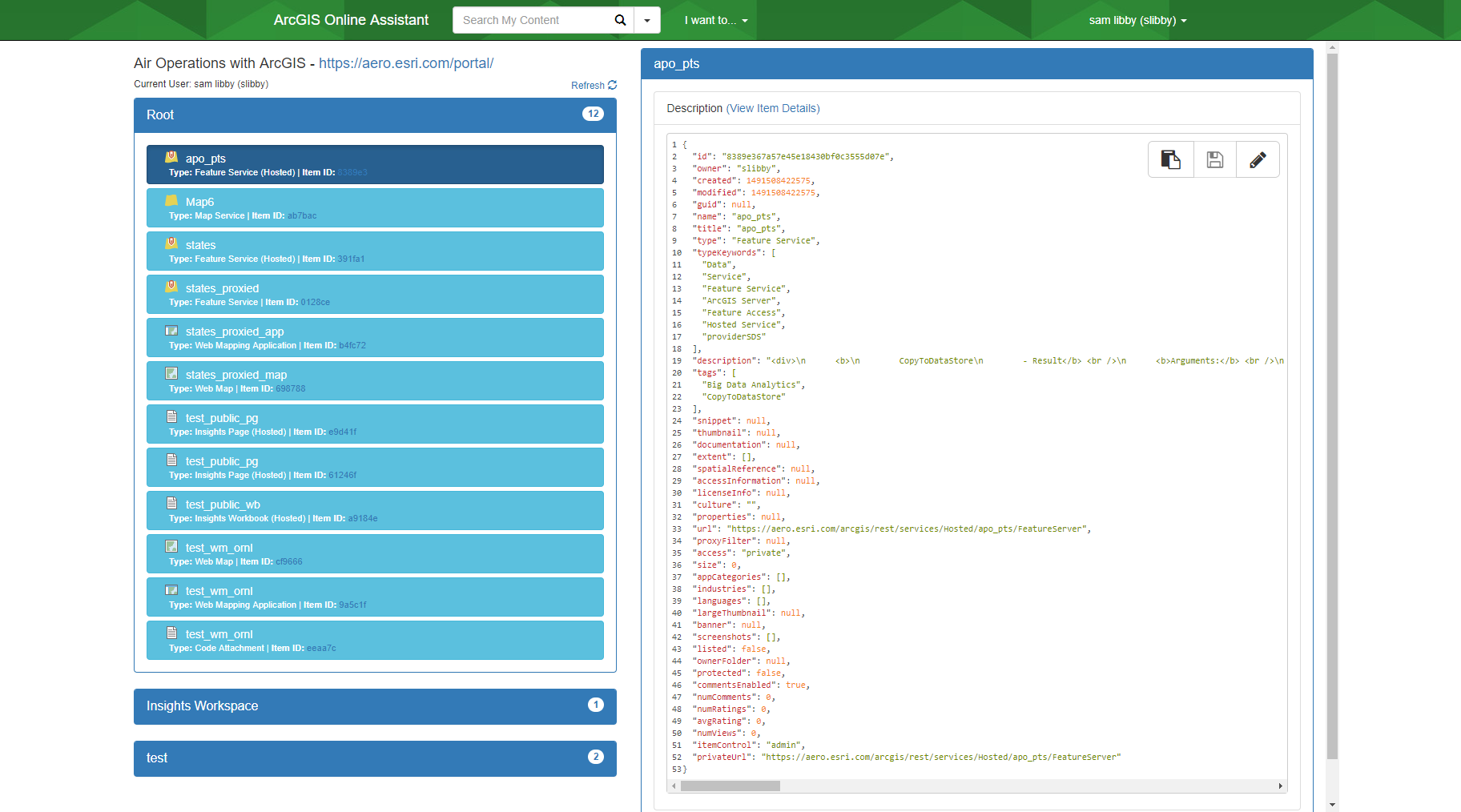
Ever want to get into the nuts and bolts of AGOL or Portal and see the JSON behind the scenes?  Well check out ago-assistant.

This application was developed by a follow co-worker, and it's awesome!  It's a nice GUI based application that gives you fine grained access to your site's information.


I find this tool coupled with fiddler can help you easily debug your applications, or better help you understand the ArcGIS REST API that performs the magic.

You can grab it from github here: https://github.com/Esri/ago-assistant

Enjoy and check it out.

A

Thursday, October 9, 2014

Using ArcREST to Export Hosted Feature Services

THIS POST IS FOR RELEASE ARCREST 2.0 AND WILL NOT WORK PERFECTLY FOR ARCREST RELEASE 3.0.

When you upload a feature class to ArcGIS Online (AGOL), you have the option to publish those feature classes. Now let's assume you have enabled editing on that data set. The question is how do you pull down the data so you can have an updated version in office? Well luckily for us, you have ArcREST to automate this task! ArcREST can be found here (www.github.com/Esri/ArcREST) if you do not have it.

This example will show how to automate the download of a hosted feature class as a shapefile to a centralized storage location.

The workflow is as follows:

  1. Connect to the AGOL site
  2. Export the item to a shapefile
  3. Download the item to disk
  4. Erase the exported item

import arcrest
import uuid
import os
import time
#   Inputs
#
itemID = "THE ITEM ID TO EXPORT"
username = "SOME USERNAME"
pw = "MY PASSWORD"
url = "http://www.arcgis.com/sharing"
filePath = r"c:\temp"
#   Logic
#
#  Create security handler
shAGOL = arcrest.AGOLTokenSecurityHandler(username, pw)
#  Connect to AGOL
org = arcrest.manageagol.Administration(url=url, securityHandler=shAGOL)
# Grab the user's content (items)
content = org.content  
usercontent = content.usercontent(username=username)
#  Create a export item with a random name using UUID
#  and export it to a zipfile
#
result =  usercontent.exportItem(title="%s" % uuid.uuid4().get_hex(),
                                     itemId=itemID,
                                     exportFormat=exportDataAs,
                                     exportParameters=None)

exportedItemId = result['exportItemId']
jobId = result['jobId']
exportItem = content.item(itemId=exportedItemId)
#   Ensure the item is finished exporting before downloading
#
status =  usercontent.status(itemId=exportedItemId, jobId=jobId, jobType="export")
    
while status['status'].lower() == "processing":
    time.sleep(3)
    status =  usercontent.status(itemId=exportedItemId,
                                 jobId=jobId,
                                 jobType="export")
filePath = exportItem.itemData(f="json", savePath=filePath)
#   Erase the exported item to clean up
#   AGOL
#
usercontent.deleteItems(items=exportItem.id)
del exportItem
print 'finishe!'

So what we have is a quick little script that downloads a file to the temp folder.  The key thing to look at is the while part of the code.  When perform actions like publish, generateFeatures, export, and createService, they are performed asynchronously on the system.  This means that you need to check if they are finished before performing further actions on the items.  The status method returns a dictionary of values, and you need to ensure that the value is not equal to 'processing', or any further actions like itemData() will return invalid information or data.  In the case of the itemData() you will download an empty zip file.

Enjoy and happy coding.